Designing Simplicity in Complexity – Building Robotics Simulation UX for O3DE
Research
Concept designs
The Challenge: Bridging Two Worlds
In 2023, I was tasked with something that seemed almost impossible: create a user experience system within O3DE (Open 3D Engine) that would allow robotics and simulation engineers to seamlessly work with IoT devices, sensors, and real-time data. The catch? I was a game development UX designer stepping into the world of industrial robotics, ROS2 systems, and sensor networks.
The objective was ambitious: build a system that could handle not just reading sensor data from real-world scenarios, but also capture simulations for IoT devices even when offline. We were partnering with high-end simulation companies who needed to track multiple scenarios over time, and the technical complexity was staggering.
But here’s what I learned: the most important UX principle applies even to the most technical domains – hide complexity, break experiences into bite-sized chunks, and keep users progressing forward.
Learning a New Language
My first challenge wasn’t designing interfaces – it was understanding what I was designing for. Robotics simulation was entirely new territory, even though I knew the 3D game production pipeline inside and out. I had to dive deep into ROS2 architecture, URDF and SDF file formats, and how physical sensors in the real world connect to cloud-based systems that respond in real-time.
This learning curve became one of my greatest assets. Coming from game development, I could see the complexity through fresh eyes and ask the crucial question: “How do we make this feel as intuitive as placing an object in a game level?”
The UX Philosophy: Hide the Complexity
Looking at our partner use cases – agricultural robots, manufacturing systems, warehouse automation, cleaning robots, automotive testing, and smart AI systems – I realized they all shared a common need: experts in robotics shouldn’t have to become experts in game engines to test their ideas.
The solution was to create familiar workflows that hid the underlying technical complexity. Instead of exposing users to the intricacies of ROS2 integration or URDF file parsing, we built interfaces that felt natural and progressive.
Five Key Workflows: From Concept to Simulation
1. Discovery Made Simple: The Integrated Marketplace
(Conceptual design – not launched)
Rather than forcing users to hunt for simulation templates and sample projects across different platforms, we built a marketplace directly into O3DE. Users could browse “Automotive Sensor 101” tutorials, download complete simulation environments, and get started immediately with guided experiences.
The key insight: onboarding should feel like shopping, not studying.
2. Import Without the Headache: URDF/SDF Conversion
One of our biggest challenges was making URDF and SDF files – the standard formats for robotics – work seamlessly within O3DE. These files contain complex robotic configurations that most game engines can’t handle right out of the box.
We created an import system that automatically converts these files into O3DE prefabs, complete with a settings dialog that explains the conversion process in plain language. Users can choose between preserving file sync or allowing direct editing, with visual icons showing exactly what happens to their data.
The principle: Never make users guess what’s happening to their files.
3. Sensors as Building Blocks: The Component Library
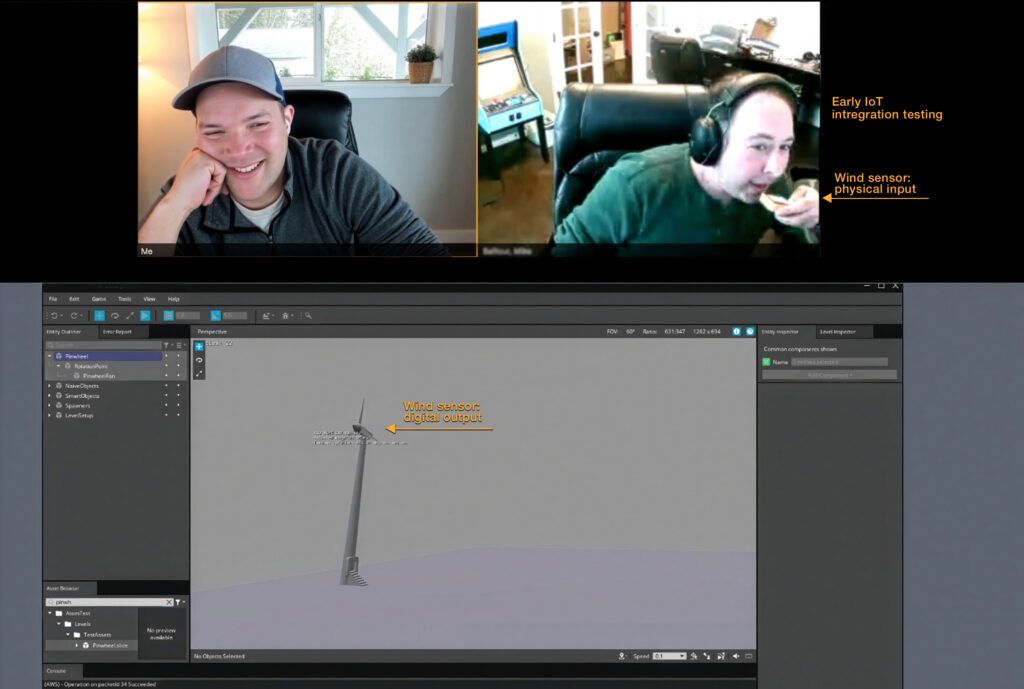
(Conceptual design – not launched) Instead of requiring users to configure sensors from scratch, we built a comprehensive library of pre-configured sensor components – temperature, smoke, vibration, pressure, leak detection, wind, and gas sensors. Each sensor comes with manufacturer-friendly customization options while working out-of-the-box for most use cases.
Users can simply drag and drop sensors from the asset browser directly into their 3D environments, just like placing props in a game
4. Real-World Connections: Digital Twin Configuration
(Conceptual design – not launched) Perhaps our most innovative workflow was enabling users to create digital twins by dragging sensors onto real-world objects in their simulations. Want to monitor gas pressure in an industrial facility? Simply drag a gas sensor component onto your 3D model of the equipment.
The interface shows real-time sensor data overlaid in the 3D environment, making abstract IoT data feel tangible and spatial.
5. Scale Without Complexity: Multi-Simulation Management
Unlike existing simulation systems that struggle with multiple IoT devices, we designed for scale from the ground up. Our AWS integration allows dozens of simulations to run simultaneously, but the user interface presents this complexity through simple project cards and status indicators.
Users see their simulations as organized projects in a familiar browser-style interface, while the system handles the complex orchestration behind the scenes
Real-World Validation
Working with our simulation company partners was crucial for validating these designs. We tested prototypes continuously, iterating based on feedback from engineers working on everything from farming robots navigating crop rows to industrial arms performing precision manufacturing tasks.
The feedback was consistently positive – partners were enthusiastic about the direction we were taking, particularly how we made complex robotics workflows feel approachable without sacrificing functionality.
Beyond the Interface: The Complete System
What made this project unique was the scope of integration required. We built 52 different components to handle various sensor types and integration patterns. We created communication bridges between O3DE and AWS to support massive scale. We integrated with ROS2, CMake, and multiple AWS services including Kinesis for real-time data streaming.
But perhaps most importantly, we designed user personas and workflows that mapped the entire journey from initial concept to deployed simulation. Understanding that our users included simulation engineers, infrastructure engineers, ML engineers, and business stakeholders meant designing for multiple skill levels and use cases within the same system.
Impact and Evolution
A lot of this work was deployed to production. Some of it was designed but never developed. However you can be experience it all by downloading O3DE today. The simulation capabilities we built expanded O3DE’s audience significantly – it’s was also featured at RosCon previously, and is now a growing part of robotics simulation conversations worldwide.
Since O3DE joined the Linux Foundation, the core simulation features continue to evolve with each engine release, maintained by a dedicated engineering team. The foundation we built for simplifying complex technical workflows continues to grow.
Key Lessons: UX Principles Apply Everywhere
This project taught me that good UX design principles are universal, even in highly specialized technical domains:
Progressive disclosure works everywhere – Hide complexity until users need it
Familiar patterns reduce cognitive load – Make new concepts feel like things users already understand
Visual feedback builds confidence – Show users what’s happening, especially with complex processes
Real user testing trumps assumptions – Partner feedback was invaluable for validating our approaches
Scale considerations should inform design from day one – Design for the future, not just current needs
The most rewarding aspect wasn’t just building a successful product – it was proving that thoughtful UX design can make even the most complex technical challenges feel approachable. Whether you’re placing a sensor in an industrial simulation or dropping an item in a game inventory, the principles of good design remain the same.
Simplicity is the ultimate sophistication – even in robotics
You can also find this article through Open 3D Foundation